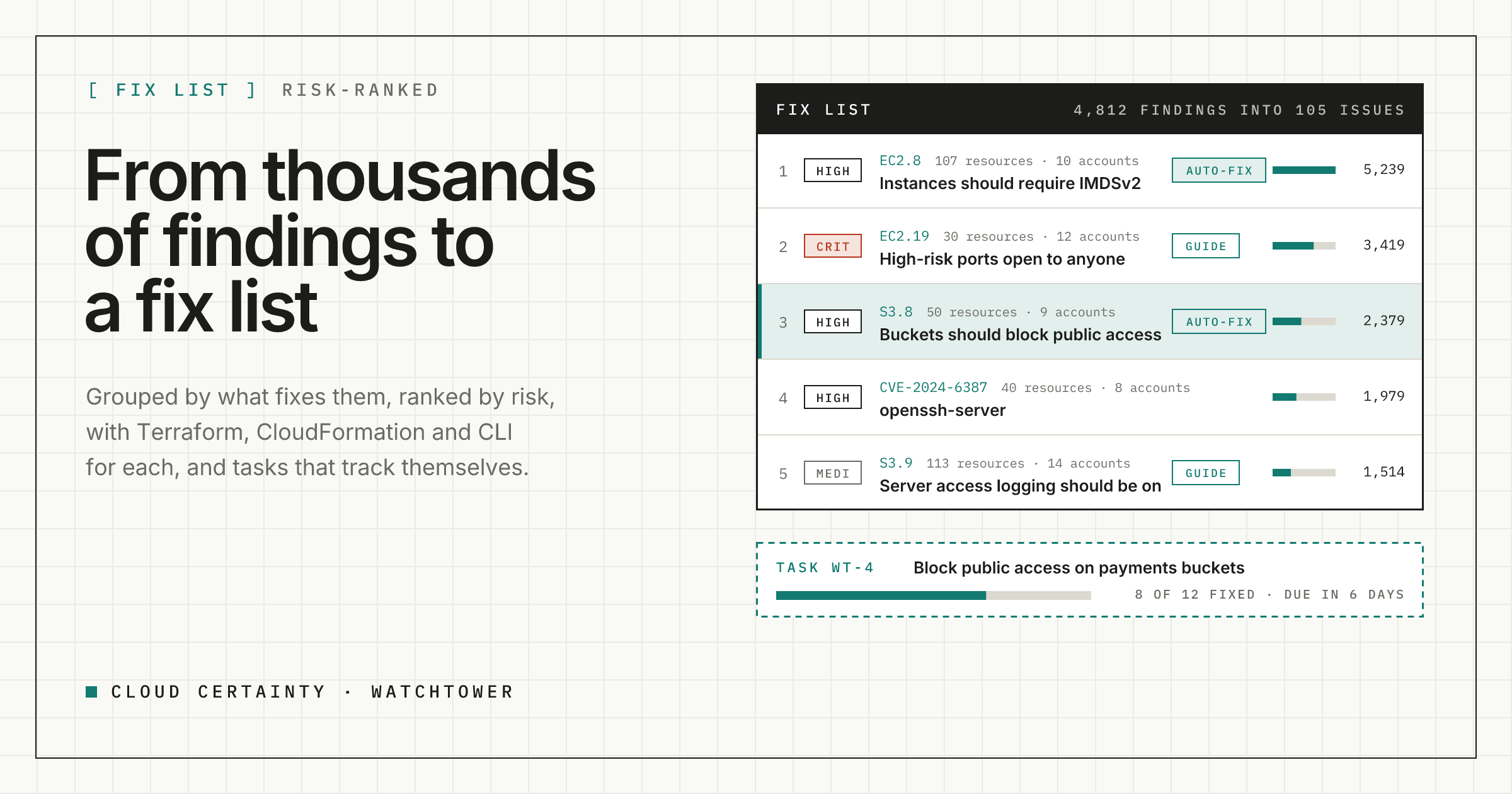
A security team with a few dozen AWS accounts can easily have several thousand open findings in Security Hub. Very few of those are separate problems. Most are the same control failing on many resources, or the same vulnerable package installed in many places. This post shows how Cloud Certainty Watchtower turns that list into a fix list, and how it keeps the work moving with tasks, SLAs and exceptions that expire.
Group findings by what fixes them
A finding in Security Hub is one check on one resource. The unit of work for an engineer is different: "turn on Block Public Access for our buckets" is one change, whether it touches five buckets or fifty.
Watchtower groups findings into issues by what fixes them:
- Security Hub controls group by control id, so every resource failing
S3.8is one issue. - Vulnerabilities from Amazon Inspector group by CVE, so
CVE-2024-6387in openssh is one issue however many instances and images have it. - Threat and data findings from Amazon GuardDuty, Amazon Macie and IAM Access Analyzer group by finding type, such as SSH brute force against EC2.
- Partner findings group by the rule that produced them.
Each issue shows how many resources, accounts and Regions it covers, how many findings are open, suppressed or fixed in the last 30 days, the oldest one, how many are past their SLA and how many are exposed to the internet.
Rank issues by risk
Sorting by severity alone puts a critical finding on one sandbox instance above a high finding on fifty production buckets. Watchtower ranks issues by a risk score that adds up its open findings:
- Severity gives each finding a weight: 40 for critical, 20 for high, 6 for medium and 2 for low.
- Age multiplies it by up to three, growing over the first 180 days, because old findings are the ones nobody owns.
- Exposure doubles it when the resource is reachable from the internet, for example a security group open to
0.0.0.0/0.
The score is deliberately simple, so anyone can see why an issue is near the top. Every filter still applies, so account:prod-* gives you the fix list of production and -task:with the issues nobody has picked up yet.
Give engineers the fix, not a link
Each common control comes with a remediation guide written for the person who will make the change: why it matters, the console steps, the AWS CLI command, and the Terraform and CloudFormation to copy. For S3.8, the Terraform reads:
resource "aws_s3_bucket_public_access_block" "this" {
  bucket = aws_s3_bucket.this.id

  block_public_acls       = true
  block_public_policy     = true
  ignore_public_acls      = true
  restrict_public_buckets = true
}
Watchtower ships guides for about 60 of the most common controls of the AWS Foundational Security Best Practices and CIS standards. Each guide also lists the Trivy and Checkov rules that check the same thing, so your scanners and Security Hub speak the same language.
Track the work as tasks
Create a task from a selection of findings, or from a whole issue, and Watchtower fills it in:
- Priority from the highest severity in it.
- Due date from your SLA for that severity. The defaults are 7 days for critical, 30 for high, 90 for medium and 180 for low, and admins can change them.
- Progress from the findings themselves. As resources pass their checks, the task shows "8 of 12 fixed" without anyone touching it, and it can close itself when the last one passes.
Tasks live on a board with owners, labels, comments and links to pull requests and GitHub issues. You can also mark the findings NOTIFIED in Security Hub, with a note that points to the task, so anyone looking in the AWS console knows the work is in hand.
Exceptions that expire
Some findings are accepted risks: a public website bucket, a bastion reachable from your VPN. In Security Hub, suppressing them is permanent, so nobody looks again.
In Watchtower, an exception has a reason, a scope (controls or issues, account patterns, Regions and resource patterns) and an expiry date. While it is active, matching findings show as suppressed, in Security Hub too when the connection allows it, with a note naming the exception. When it expires, or someone revokes it, the findings come back as new. Exceptions are listed for everyone and audited, and creating one needs the triage permission over its whole scope.
Try it
Watchtower is in early access ahead of its AWS Marketplace launch. Read more at cloudcertainty.com/watchtower (opens in a new tab), or email [email protected] to try it in your organisation.