
Caches, keys and commands in one place, in your own AWS account.
Cloud Certainty Memora gives your engineers one place to see, run, fix and explore Amazon ElastiCache for Valkey, Redis OSS and Memcached across your AWS accounts and Regions: every cache with its metrics, cost and findings, full control of each one, and a key browser, a command workbench and memory analysis built for teams. You decide who may see, read, change or operate which caches and keys, and Memora, AWS and the cache itself enforce it. No cache passwords handed out, no bastion, and nothing leaves your account.
ONE CLOUDFORMATION STACK · YOUR ACCOUNT · YOUR IDP · EARLY ACCESS · PLANNED FROM $100 A MONTH
Not on AWS Marketplace yet. Early access by email: [email protected].
[ A ] WHAT THE ELASTICACHE CONSOLE LACKS, AND WHAT MEMORA ADDS
The ElastiCache console runs the control plane of one account and one Region, and reaches data only through a command line in AWS CloudShell. Teams that run caches in production end up with bastions and port forwarding, a shared password in a desktop tool, SCAN loops written by hand and a bill nobody adds up. Memora covers the gaps and keeps everything in your account.
Overview
The ElastiCache console:One Region and one account at a time.
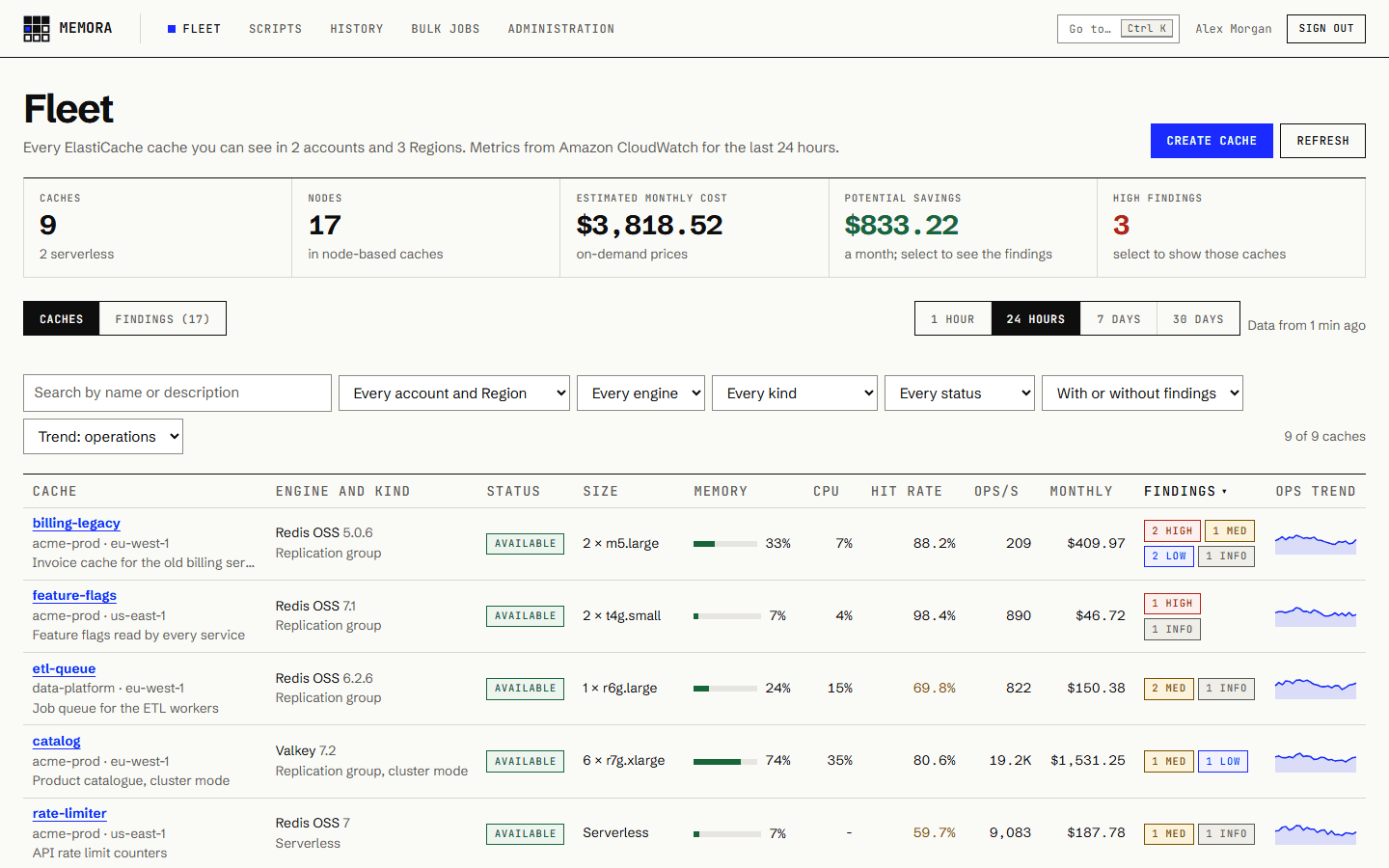
Memora:A fleet view of every cache across your accounts and Regions: engine and version, nodes, memory, engine CPU, hit rate, throughput and an estimated monthly cost, from CloudWatch, for the last hour, day, week or 30 days.
Cost and hygiene
The ElastiCache console:No cost per cache, and problems found only by reading each cache.
Memora:Findings with what fixing them saves: Redis OSS 4 and 5 on paid Extended Support, the saving of moving to Valkey, underused and previous-generation nodes, no encryption, authentication, failover or backups, memory pressure and pending service updates.
Data
The ElastiCache console:A command line in AWS CloudShell, and no key browser or value editor.
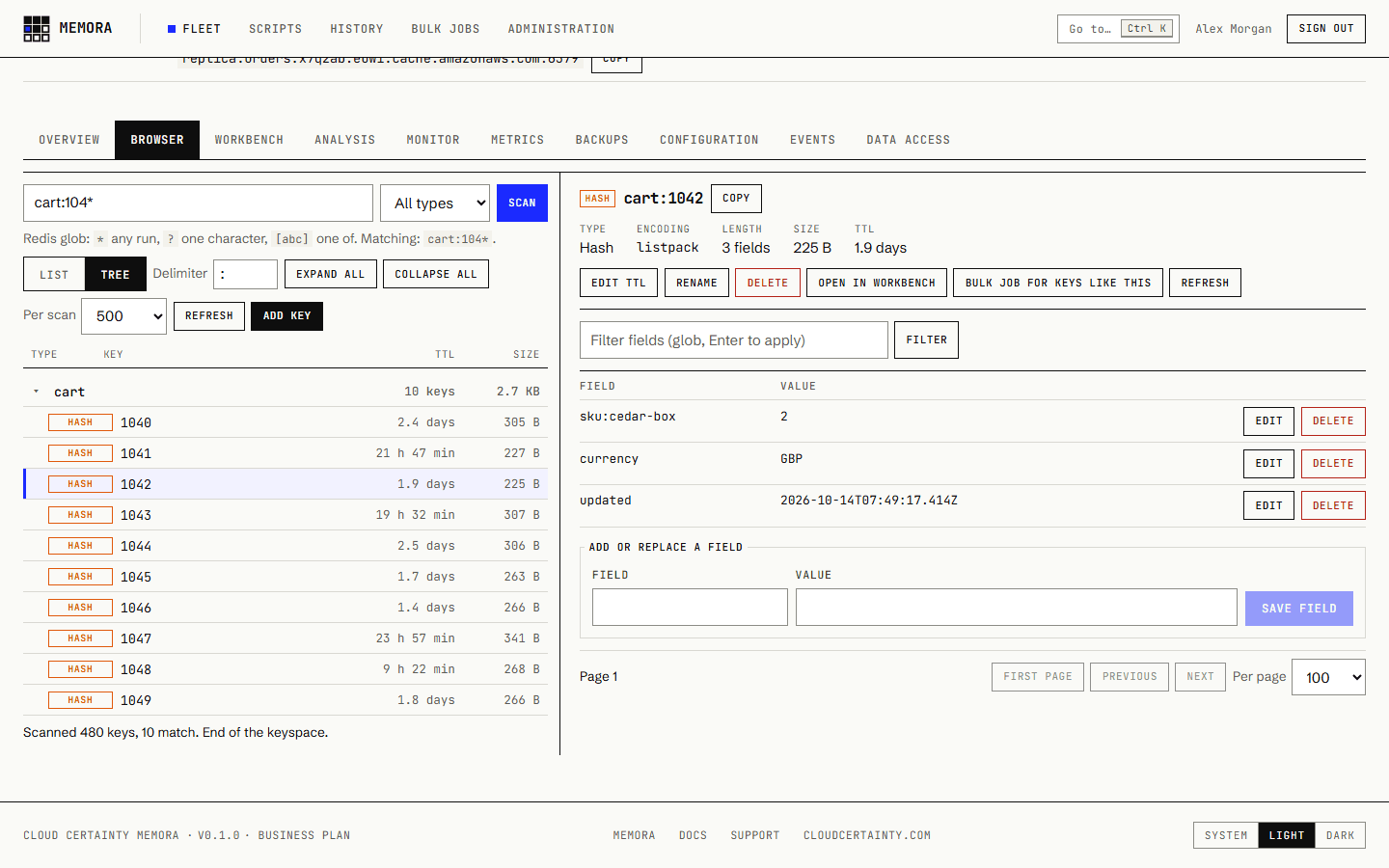
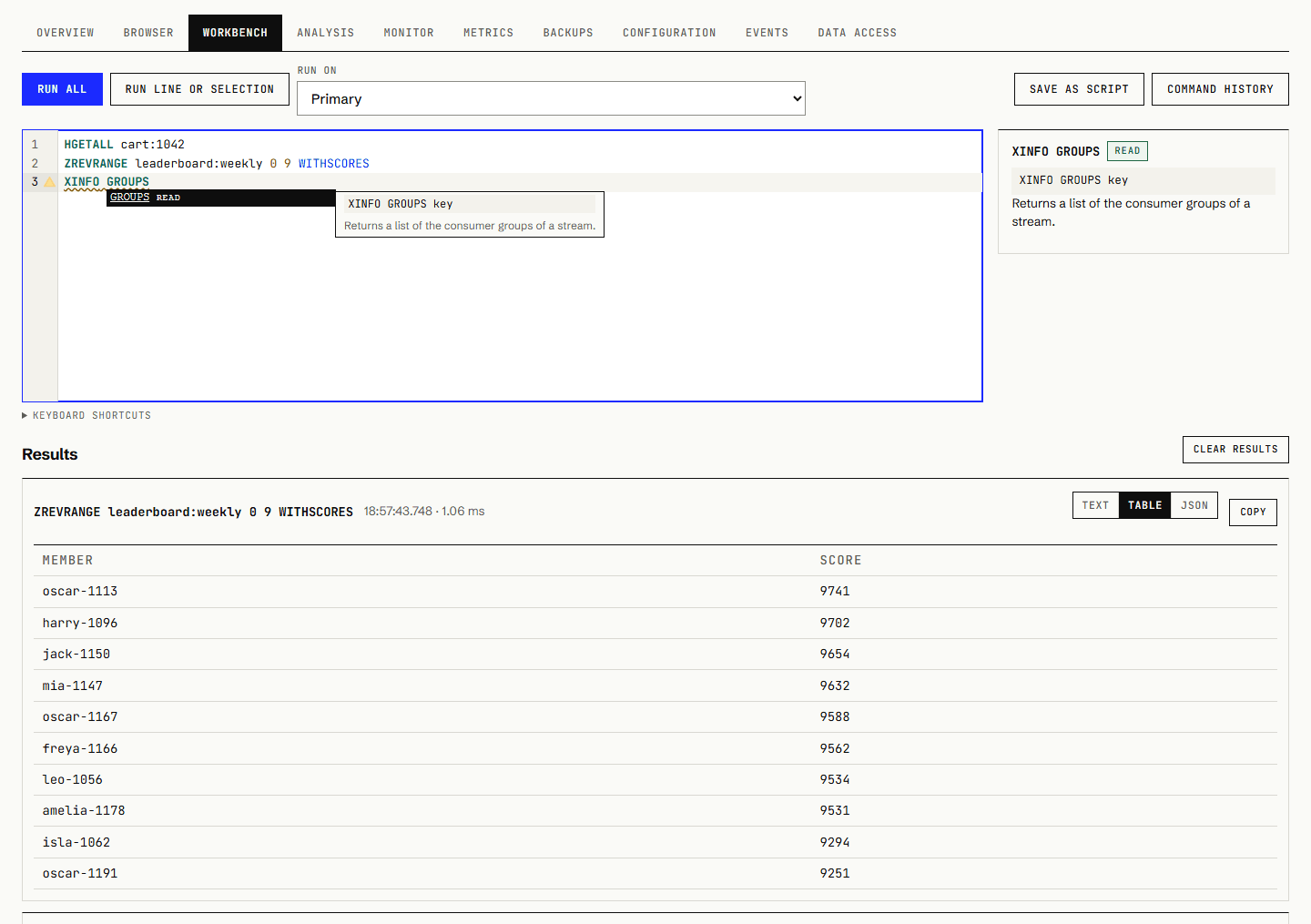
Memora:A key browser that scans safely, never KEYS, with a tree by prefix and editors for every type; a workbench with autocomplete and help for every Valkey and Redis OSS command; results as text, tables or JSON.
Network
The ElastiCache console:Caches are reachable only inside their VPC, so a GUI needs a bastion, port forwarding or a VPN.
Memora:Nothing to tunnel: two small Lambda functions in the caches’ VPC reach the data, invoked only by Memora’s roles. They accept no inbound connections and cost nothing while idle.
Memory
The ElastiCache console:No big key, prefix or TTL analysis; the advice is valkey-cli --hotkeys.
Memora:Sampled memory analyses by type, TTL and key prefix, with the biggest keys and recommendations, stored and comparable, and estimated on serverless caches where MEMORY USAGE is blocked.
Bulk work
The ElastiCache console:Deleting or expiring keys by pattern means writing a SCAN loop by hand.
Memora:Delete, expire or persist millions of keys by pattern, with a preview, a rate you choose and cancel, carried out by Memora’s own Step Functions workflow in your account, as you. Team and above
Team access
The ElastiCache console:Whoever has the cache’s password has all of it, and IAM can’t say “read cart:* but don’t change it”.
Memora:Grants per user or group: view, read, write, operate or manage on cache patterns such as “orders-*”, per account and Region, and key patterns such as “cart:*” for reads and writes. Key patterns: Business
Who did it
The ElastiCache console:Not recorded for data. CloudTrail shows the IAM role.
Memora:A command history of who ran what, on which cache and how long it took, an audit log of every change, and the user’s email as the source identity of every AWS session, so CloudTrail names the person.


[ B ] WHAT YOUR ENGINEERS GET
Find what a cache costs and why it is slow, read and fix its data, and scale or upgrade it, without AWS console access or a cache password. Users see only the caches they are granted, data only with the read permission, and actions they may not take are greyed out with the reason.
- Fleet
- Every cache you may view, in every account and Region, with memory, CPU, hit rate, throughput, cost and findings. Sort by findings to see what costs too much or is at risk.
- Cache page
- Topology of shards and nodes with their roles and Availability Zones, endpoints, every CloudWatch metric, events, backups and the configuration.
- Control
- Take, copy and restore backups, scale node types, replicas, shards or serverless limits, test failover, reboot, apply service updates and upgrade the engine, Redis OSS to Valkey included.
- Browser
- Keys by SCAN, as a list or a tree by prefix, with type, TTL and size, and editors for strings, JSON, hashes, lists, sets, sorted sets and streams with their consumer groups.
- Workbench
- redis-cli syntax with autocomplete and help, transactions, cluster commands sent to every primary, and saved scripts with versions, private or shared.
- Analysis
- Memory by type, TTL and key prefix, the biggest keys and keys without a TTL, with links to fix them. Up to 250,000 keys per analysis, by plan.
- Monitor
- INFO from every node, the slow log, the client list and Pub/Sub sampling, on node-based and serverless caches alike where ElastiCache allows it.
- Bulk jobs
- Delete, expire or persist keys by pattern, paced and resumable, with progress you can watch and a cancel button. Team and above.
- Cache orders-prod · eu-west-1
- Engine Valkey 8.1
- Type hash
- Fields 4 · 312 B
- TTL 29 min 12 s
- Your access write on cart:*
 (opens full size in a new tab)
  (opens full size in a new tab)
  (opens full size in a new tab)
 [ C ] WHY NOT REDIS INSIGHT
Redis Insight is a good desktop tool for one developer and one cache. A team on ElastiCache needs more than a data browser: who may see which caches and keys, no shared passwords, no network path per person, and a record of who ran what. Memora has its own browser, workbench and memory analysis, built into the same app as the control plane, with these properties together.
- User accounts and roles
- One sign-in with your identity provider for the fleet, the control plane and the data. A desktop tool gives everyone who reaches it every connection.
- No passwords handed out
- IAM authentication signed inside the connector with tokens that last 15 minutes, or Secrets Manager read only by the connector. Desktop tools take static passwords.
- No network path per person
- People use a browser; the connector in the VPC reaches the cache. Nobody needs a bastion, a tunnel or a server left running.
- Every command attributed
- A history of who ran which command on which cache, and CloudTrail entries with the person’s email.
- ElastiCache’s rules known
- Commands ElastiCache restricts, and the ones serverless caches refuse, are refused first with the reason, before they reach the cache.
- Control and data together
- Find the big keys, then scale the cache or upgrade it to Valkey, from the same page, with the same grants.
- Your teams keep using the tools they like for local development: Memora is for the caches in your AWS accounts, shared by everyone who works on them
- Valkey and Redis OSS, node-based and serverless, cluster mode on or off, with SCAN sent to every primary
- On Business and above, key patterns limit a person’s reads and writes on a cache, so support can fix carts without seeing payment tokens
orders-prod> HGETALL cart:7f3a
1) "sku:1042"
2) "2"
3) "currency"
4) "EUR"
orders-prod> HSET cart:7f3a sku:1042 3
(integer) 0
orders-prod> GET payment:token:991
(refused) payment:token:991 is outside
  your key patterns (cart:*)
orders-prod> KEYS *
(refused) KEYS blocks the engine:
type the cache id, or use the browser[ D ] WHAT ADMINISTRATORS CONTROL
Connections
This account from the start; other accounts through a spoke role with an external ID, one by one or across an AWS Organization with a StackSet. Each role has an access level, Read, Operate or Full, that Memora can never exceed.
Connectors and data access
A read and a write connector function in each VPC that holds caches. Per cache, Memora creates the ElastiCache users memora-read and memora-write with IAM authentication, or uses your Secrets Manager secrets.
Grants
view, read, write, operate and manage for users and groups from your identity provider, on cache name patterns, per connection and Region. On Business and above, key patterns limit reads and writes to keys such as cart:*.
Enforced three times
Memora checks every grant; AWS enforces it again through a session policy on every request, invoking only the connector function the request needs; and the cache’s own ACL lets the read function only read.
Safety settings
FLUSHDB and FLUSHALL off unless you allow them, a size limit on values, the key browser’s scan size, whether command values are recorded, ElastiCache users and user groups, and the IP allowlist on Business and above.
Usage and audit
Commands, writes, reads, analyses, bulk keys and changes per day, and per user on Business and above. An audit log of every change, with the person and source IP, kept for 30 days to 10 years by plan.
[ E ] SECURITY
Nothing leaves your account
Your caches and their data stay in ElastiCache, and everything Memora stores is in DynamoDB in your account. Cloud Certainty runs no service in the data path, and Memora sends no telemetry. The one outbound request is an optional daily read of a public release manifest.
Least privilege, three times
Users see no cache until they are granted one. The API checks the grant, AWS enforces it again through a per-request session policy, and for data the cache’s own ACL is a third layer: the read function signs in as memora-read, which can only read.
Values are never stored
Values are read by the connector, shown in the browser that asked and dropped. Command records keep command names and up to three keys, analyses keep key names, types, sizes and TTLs, and full command text only if an administrator turns it on.
Safe on production
SCAN in batches, never KEYS; blocking and connection-holding commands never run; FLUSHDB and FLUSHALL off by default; values and responses cut at a size limit; bulk jobs at a rate you choose.
Audit
CloudTrail names the person on every ElastiCache call and connector invocation Memora makes, and the audit log keeps every change and data write for 30 days to 10 years by plan.
The security overview has the threat model, the IAM roles, the connector’s network and data flows, and the shared responsibility a security review needs.
[ F ] RUNS IN YOUR ACCOUNT, FROM LAUNCH TO THE FIRST KEY
- 01
Deploy
Launch one CloudFormation stack in your own account and Region. It is serverless, so it costs close to nothing while nobody is using it.
Stays in your account
Connections, grants, scripts, command records, analyses, bulk jobs and the audit log are in DynamoDB in your account. Nothing is sent to Cloud Certainty.
Licensed through AWS
The licence is read from AWS License Manager in your own account. Nothing phones home.
- 02
Sign in
Users sign in through Amazon Cognito with MFA or AWS IAM Identity Center on every plan, or your own SAML or OIDC provider, such as Microsoft Entra ID or Okta, on Team and above.
Only trusted identities
Roles and grants follow the user’s email, so Memora accepts only emails your directory asserts or has verified.
- 03
Connect accounts and VPCs
Caches in this account are there from the start. Reach other accounts through a small IAM role, and the data in each VPC through a connector stack, at the access level you choose.
The role is the ceiling
Read only looks and reads data. Operate, the default, adds changing data and operating caches. Only Full can create, delete and reconfigure them.
- 04
Grant and work
Give teams view, read, write, operate or manage on their caches. They find big keys, fix data and scale caches without AWS console access or a cache password.
Scoped on every request
Each AWS call runs with credentials that last 15 minutes, narrowed by a session policy to the user’s grants.
Every action traced
The user’s email is the source identity of every session, so CloudTrail names the person.
One stack: a serverless API (API Gateway and Lambda), the web app on Amplify Hosting, Amazon Cognito sign-in, DynamoDB, a connector in the VPC of your caches, and Memora’s own Step Functions workflow for bulk jobs. The installation guide lists every parameter.
[ G ] PLANS AND PRICING
The pricing planned for the AWS Marketplace launch: contract pricing, monthly or 12 months up front. Plans are not priced per user, per cache, per node or per command: everyone in your organisation can use Memora. Prices in US dollars, billed through your AWS bill.
Starter
For a small team that needs a better ElastiCache console and a safe key browser: the fleet with findings, full control, the workbench and grants per cache.
- AWS accounts
- 3
- Keys per memory analysis
- 10,000
- Keys per bulk job
- No bulk jobs
- Saved scripts per user
- 50
- Command history, analyses and bulk jobs kept
- 30 days
Team
Adds shared scripts, bulk delete, expire and persist by key pattern, and your own SAML or OIDC sign-in.
- AWS accounts
- 10
- Keys per memory analysis
- 50,000
- Keys per bulk job
- 100,000
- Saved scripts per user
- 500
- Command history, analyses and bulk jobs kept
- 90 days
Business
Adds governance: key patterns in grants, so support can fix carts without seeing payment tokens, usage per user and the IP allowlist.
- AWS accounts
- 50
- Keys per memory analysis
- 100,000
- Keys per bulk job
- 1,000,000
- Saved scripts per user
- 2,000
- Command history, analyses and bulk jobs kept
- 365 days
Enterprise
Everything in Business, with the highest limits, unlimited bulk jobs and ten years of audit log.
- AWS accounts
- Unlimited
- Keys per memory analysis
- 250,000
- Keys per bulk job
- Unlimited
- Saved scripts per user
- Unlimited
- Command history, analyses and bulk jobs kept
- 730 days
| Feature | Starter | Team | Business | Enterprise |
|---|---|---|---|---|
| Per month | $100 | $250 | $1,000 | $2,500 |
| 12 months | $1,000 | $2,500 | $10,000 | $25,000 |
| AWS accounts | 3 | 10 | 50 | Unlimited |
| Keys per memory analysis | 10,000 | 50,000 | 100,000 | 250,000 |
| Keys per bulk job | No bulk jobs | 100,000 | 1,000,000 | Unlimited |
| Saved scripts per user | 50 | 500 | 2,000 | Unlimited |
| Command history, analyses and bulk jobs kept | 30 days | 90 days | 365 days | 730 days |
| Versions kept per script | 5 | 25 | 50 | 100 |
| Audit log kept | 30 days | 90 days | 365 days | 3,650 days |
| Shared scripts | Not included | Included | Included | Included |
| Bulk delete, expire and persist by key pattern, paced and resumable, run by a Step Functions workflow in your account | Not included | Included | Included | Included |
| SAML and OIDC identity providers, such as Microsoft Entra ID and Okta | Not included | Included | Included | Included |
| Key patterns in grants, such as cart:*, for reads and writes | Not included | Not included | Included | Included |
| IP allowlist on every API call | Not included | Not included | Included | Included |
| Usage per user | Not included | Not included | Included | Included |
Every plan includes
- Fleet view of every cache across accounts and Regions, with memory, engine CPU, hit rate, throughput, estimated monthly cost and findings
- Findings with savings: Redis OSS on paid Extended Support, the Valkey saving, underused and previous-generation nodes, no encryption, authentication, failover or backups
- Cache pages with topology, metrics, events, backups, scaling, failover tests, reboots, parameter groups, tags and service updates
- Engine upgrades, including Redis OSS to Valkey in place, and creating and deleting caches
- A SCAN-based key browser with a tree by prefix and editors for strings, JSON, hashes, lists, sets, sorted sets and streams
- A command workbench with autocomplete and help, private scripts with versions, and a history of who ran what
- Memory analysis by type, TTL and key prefix with the biggest keys; INFO, the slow log, clients and Pub/Sub sampling
- ElastiCache users and user groups, connectors in your VPCs and IAM data access set up for you
- Grants per user or group on cache name patterns, enforced by Memora, AWS session policies and the cache’s ACL
- Connections to other AWS accounts, usage totals, an audit log, Amazon Cognito sign-in with MFA and IAM Identity Center
Pricing for the launch
Memora is in early access and not on AWS Marketplace yet. These are the plans and prices planned for the launch. Until then, ask for early access.
Business and Enterprise are add-ons
On the Memora listing, Team is the base plan. Business is Team plus the Business add-on ($750 a month or $7,500 for 12 months), and Enterprise adds the Enterprise add-on to both ($1,500 a month or $15,000 for 12 months). An add-on on its own grants nothing. Starter is a separate listing, Memora Starter.
ElastiCache is billed by AWS
Your caches are billed by ElastiCache as usual, and commands Memora runs on a serverless cache are billed in ECPUs like any client’s. The connector functions, CloudWatch metric reads, Lambda, API Gateway, DynamoDB and Cognito cost pennies a month for a team.
Support
Basic support is included. Paid plans with response times, and a fixed-price installation service, are on the support page. Questions about plans: [email protected].
[ H ] QUESTIONS
- Can I use Memora today?
- It is in early access. It is not on AWS Marketplace yet; email us about your AWS setup and we will set you up ahead of the launch.
- Does any data leave my AWS account?
- No. The stack runs in your account and calls AWS only. Everything Memora stores is in DynamoDB in your account, cache values are never stored, and the licence is read from AWS License Manager there.
- Which engines does it support?
- Valkey and Redis OSS, node-based and serverless, for everything, data included. Memcached caches appear in the fleet with their metrics, cost and findings, and can be configured, scaled and deleted.
- What does it cost to run?
- The licence is a monthly or 12-month contract. ElastiCache bills your caches as usual. The connector functions, Lambda, API Gateway, DynamoDB and Cognito cost pennies a month for a team, and the findings usually pay for the licence.
More in the FAQ, including Extended Support for Redis OSS, what works on ElastiCache Serverless and how Memora compares with the ElastiCache console and monitoring tools, and the documentation.
Amazon Web Services, AWS, Amazon ElastiCache, AWS Lambda, AWS Step Functions, AWS CloudTrail and AWS Marketplace are trademarks of Amazon.com, Inc. or its affiliates. Redis and Redis Insight are trademarks of Redis Ltd.; any rights therein are reserved to Redis Ltd., and any use by Cloud Certainty is for referential purposes only and does not indicate any sponsorship, endorsement or affiliation. Valkey is a trademark of LF Projects, LLC. Memora is a product of Cloud Certainty OÜ and is not affiliated with or endorsed by Amazon.