A new CloudWatch log group keeps everything for ever unless someone sets a retention. Lambda creates /aws/lambda/<function> the first time a function runs, with no retention. Deleting the function leaves the log group, and everything in it, behind. Multiply that by a few years and a few dozen accounts, and storage becomes a line on the bill nobody can explain.
This post shows how to find the log groups worth fixing, how much fixing them saves, and how to change hundreds of them without mistakes.
Find the log groups that never expire
retentionInDays is missing from a log group that never expires:
aws logs describe-log-groups \
  --query 'logGroups[?retentionInDays==null].[logGroupName,storedBytes]' \
  --output text | sort -k2 -n -r | head -20
Sorted by stored bytes, the top of that list is where the money is. Storage costs $0.03 per GB-month in us-east-1, measured on the compressed size, so a 2 TB log group that never expires costs about $60 a month on its own, every month, and more each month.
Find the orphans and the stale ones
Two other kinds of log group are almost always safe to cut back:
Orphaned Lambda log groups. Compare
/aws/lambda/<name>log groups with the functions that still exist:bashaws lambda list-functions --query 'Functions[].FunctionName' --output textA log group whose function is gone will never receive another event. Its contents may still matter for an audit, but rarely for ever.
Stale log groups. Anything with no
IncomingBytesfor 30 days or more: decommissioned services, old test environments, one-off jobs.
Estimate the saving before you change anything
CloudWatch can't tell you how a log group's stored bytes are spread over time. A reasonable estimate is to assume they are spread evenly over the log group's age. A log group created two years ago that you cut to 90 days keeps roughly 90/730 of what it stores now. CloudWatch deletes expired events within about 72 hours of the change, so the saving shows up on the next bill.
Two things to check first:
- Compliance. Some logs, such as CloudTrail and audit trails, may have to be kept for a set period. Set their retention to that period rather than leaving them out of the clean-up.
- Subscriptions and exports. If a log group already streams to S3 or another store through a subscription filter, the copy in CloudWatch is often the one you need least.
Change retention at scale
Retention is one call per log group:
aws logs put-retention-policy \
  --log-group-name /aws/lambda/legacy-report-gen --retention-in-days 30
CloudWatch only accepts its own list of values (1, 3, 5, 7, 14, 30, 60, 90, 120, 150, 180, 365, 400, 545, 731, 1096, 1827, 2192, 2557, 2922, 3288 or 3653 days). delete-retention-policy puts a log group back to never expire. PutRetentionPolicy is limited to five requests a second per account and Region, so a script over thousands of log groups needs to pace itself and retry.
While you are there, two settings are worth a look:
- Deletion protection, added in November 2025, stops someone deleting an important log group by mistake.
- The Infrequent Access class halves the ingestion price for logs you only search with Logs Insights. A log group's class can't be changed after it is created, and Infrequent Access has no Live Tail, metric filters or subscription filters, so it suits audit and archive log groups you create from now on.
How TraceHound does it
TraceHound keeps a daily history of every log group's stored bytes and ingestion, and turns it into recommendations on its Storage and cost page:
- log groups that never expire, largest first;
- Lambda log groups whose function no longer exists;
- log groups with no ingestion for 30 days or more, and empty ones;
- the fastest growers and the noisiest log groups;
- log groups without a customer managed key or deletion protection.
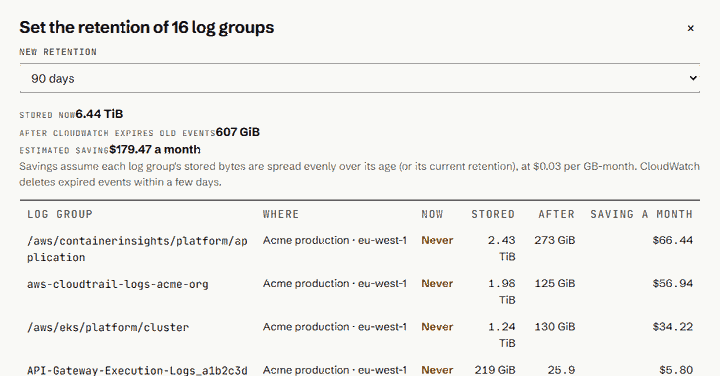
Each recommendation shows its estimated monthly saving. Choosing "Set retention" opens one dialog for all of them. It shows every log group's stored bytes now, after expiry and the saving, and leaves out the ones you aren't allowed to change, with the reason. In the example above, 16 never-expire log groups holding 6.44 TB came down to about 600 GB at 90 days: a saving of about $179 a month.
Retention changes are deliberately guarded:
- they need the Team plan, a connection whose IAM role allows retention changes, and the manage permission on each log group;
- the role can change retention and nothing else: it can't delete log groups or their events;
- every change is in the audit log with the old and new values, and CloudTrail names the person.
Try it
TraceHound is in early access. See changing retention in bulk (opens in a new tab) in the user guide, read about TraceHound (opens in a new tab), or email [email protected].