Logs hold some of the most sensitive data in an AWS account: request bodies, user ids, error messages with more detail than anyone intended. Access to them usually ends up in one of two places. Either everyone gets read access to every log group, or someone writes and maintains an IAM policy per team, listing log group ARNs by hand.
Cost has a similar problem. Logs Insights charges $0.005 per GB scanned, whoever runs the query. DescribeQueries now returns who ran each query and how many bytes it scanned, but nothing turns that into a report, a budget or a name you can talk to.
This post shows how Cloud Certainty TraceHound handles both.
Grants on log group patterns
In TraceHound, admins grant access to users and groups from your identity provider. A grant names a connection (an AWS account), the Regions, one or more log group name patterns and the permissions:
- browse: see the log group, its size, growth, ingestion, cost, settings and related resources;
- read: search and query its events, open context around an event, and use Live tail;
- export: download results and events, and create snapshots others can open;
- manage: change its retention, on connections set up to allow it.
Patterns use * and ? as IAM does. Some examples:
- the payments group gets read and export on
/aws/lambda/payments-*and/ecs/payments-*; - the platform group gets read on everything;
- finance gets browse on everything, so they see sizes and costs but not a single event;
- the security team gets read on
aws-cloudtrail-logs-*.
A log group someone holds no grant on simply doesn't appear for them.
Enforced by AWS, not just by the app
The grants are not only checked by TraceHound. Each AWS account you connect has an IAM role created by a small CloudFormation stack. For every request, TraceHound assumes that role in the person's name and attaches a session policy built from their grants:
StartQuery,FilterLogEvents,GetLogEventsandStartLiveTailare allowed only on the ARNs of the log groups their grants match;- the few actions AWS can't scope to a log group, such as
StopQuery, are allowed on*, and TraceHound checks the query belongs to the caller; logs:Unmaskis never allowed, so data a data protection policy masks stays masked;- if someone's grants are too many to fit in a session policy, the request is refused, never widened.
Each session carries the person's email as its source identity, which AWS doesn't allow to change for the rest of the session. CloudTrail in the account that owns the logs therefore shows who ran each query, not just which role.
Who ran what, and what it cost
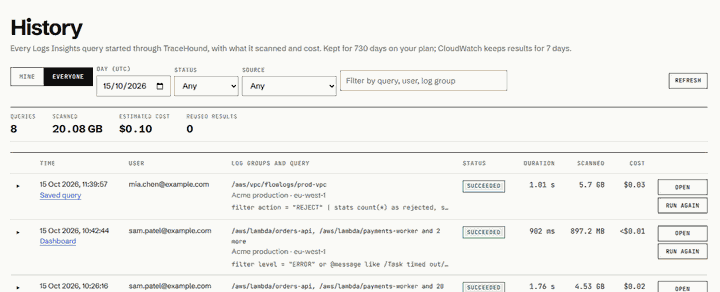
Every Logs Insights query started through TraceHound is kept in its history, whether it came from the explorer, a dashboard panel, a trace or a saved query. The history shows who ran it, on which log groups, how long it took, what it scanned and what it cost. CloudWatch keeps query results for seven days; TraceHound keeps the history for 30 days to two years, depending on the plan.
Admins see everyone's queries by day, and a usage report with Logs Insights cost and Live Tail minutes per person and per Region. On the Business plan you can also set a daily scan budget per person: once someone has scanned that many GB in a day, new queries stop until tomorrow, with a clear message instead of a surprise on the bill. Dashboards help too: a panel refreshed within the same minute reuses the earlier result instead of scanning again.
Live Tail is billed per session minute, so TraceHound shares one Live Tail session between everyone watching the same log groups. It stops the session when the last viewer leaves, counts the minutes per person, and can cap them per day.
The rest of the controls
- Sign-in with IAM Identity Center, your own SAML or OIDC provider (Team plan and above), or Cognito users with MFA.
- An audit log of admin changes, exports, snapshots and retention changes, also written to CloudWatch Logs in your account.
- An IP allowlist on every API call (Business plan and above).
- Nothing leaves your account. TraceHound runs in your AWS account, and the vendor has no access to it or to your logs.
Try it
TraceHound is in early access. Read the security overview (opens in a new tab) for the full detail, see what TraceHound does (opens in a new tab), or email [email protected].