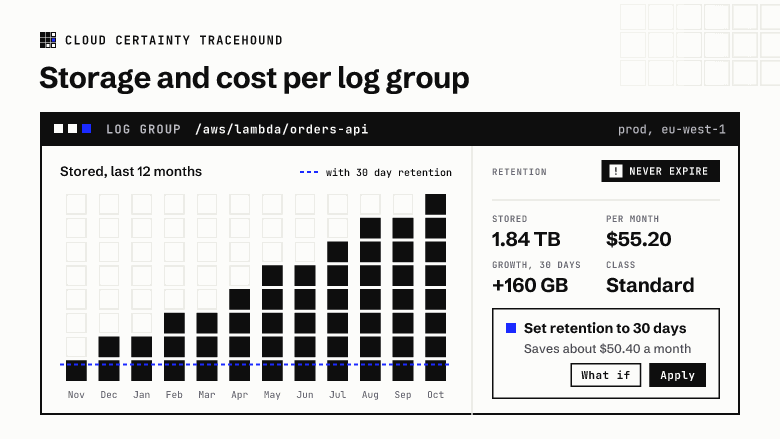
CloudWatch Logs often ends up as one of the larger lines on an AWS bill, and one of the hardest to explain. The bill tells you how much you paid for ingestion, storage and queries. It doesn't tell you which log groups that money went on.
This post shows how to work it out yourself, where the data falls short, and what TraceHound does about it.
The three costs of a log group
For a Standard class log group in us-east-1, the prices are:
- Ingestion: $0.50 per GB, measured on the uncompressed size of what you send. Infrequent Access log groups pay $0.25.
- Storage: $0.03 per GB-month, measured on the compressed size CloudWatch keeps.
- Queries: Logs Insights charges $0.005 per GB scanned, whoever runs the query.
Vended logs, such as VPC Flow Logs, get cheaper per GB at high volumes, and there is a small free tier each month. For most log groups, though, ingestion plus storage is the number that matters.
Ingestion: IncomingBytes per log group
CloudWatch publishes IncomingBytes and IncomingLogEvents in the AWS/Logs namespace, with a LogGroupName dimension. A daily sum over the last 30 days gives you the ingestion half of the bill:
aws cloudwatch get-metric-statistics \
  --namespace AWS/Logs --metric-name IncomingBytes \
  --dimensions Name=LogGroupName,Value=/aws/lambda/orders-api \
  --start-time 2026-09-15T00:00:00Z --end-time 2026-10-15T00:00:00Z \
  --period 86400 --statistics Sum
Doing this for thousands of log groups means GetMetricData with up to 500 metrics per call. It is billed at $0.01 per 1,000 metrics requested, so a Region with 2,000 log groups costs a few cents a day to measure.
Storage: storedBytes, and what it can't tell you
DescribeLogGroups returns storedBytes for every log group:
aws logs describe-log-groups \
  --query 'logGroups[].[logGroupName,storedBytes,retentionInDays]' --output text
That is the size now. There is no history of it, so you can't tell whether a log group grew by 50 GB last week or has been the same for a year. Unless you turn on intelligent tiering, which publishes a daily StoredBytes metric, CloudWatch keeps no growth history at all.
A worked example
Take a log group that ingests 20 GB a day and has never expired anything:
- ingestion: 20 GB × 30 days × $0.50 = $300 a month;
- storage: if it now holds 1.84 TB, that is 1,840 GB × $0.03 = $55.20 a month, and it grows every month the log group keeps everything;
- queries: one Logs Insights query over the last 30 days scans about 600 GB, which costs $3. A dashboard panel that refreshes every five minutes over that range would cost far more than the storage.
The storage line looks small next to ingestion, until you add up two or three years of never-expire log groups across every account.
What TraceHound does
TraceHound runs a small collector in your AWS account. Once a day, for every connected account and Region, it:
- lists every log group and its stored bytes;
- reads the previous day's
IncomingBytesandIncomingLogEventsfor each one; - stores the result, so stored bytes become a history.
On its first run it backfills 90 days of ingestion, so charts are useful straight away. Stored bytes history starts on the day you install it, because CloudWatch can't tell anyone what a log group held in the past.
From that history, the log groups table shows each group's growth over 7 and 30 days, its ingestion over 1, 7 and 30 days, and an estimated monthly cost split into ingestion and storage. The Storage and cost page charts growth across all your log groups, ranks the fastest growers and biggest costs, and adds the Logs Insights and Live Tail spend people ran through TraceHound. Prices are settings, so you can match them to your Region or your discount.
Try it
TraceHound is in early access. See Storage and cost (opens in a new tab) in the user guide, read about TraceHound (opens in a new tab), or email [email protected].