Sooner or later someone looks at the Athena line on the AWS bill and asks a simple question: who is running these queries? It turns out to be one of the harder questions to answer about Athena.
What Athena tells you out of the box
Athena prices queries by the data they scan: $5 per terabyte, rounded up to the nearest megabyte with a 10 MB minimum (opens in a new tab) per query. Every query execution records how many bytes it scanned, so the cost of a single query is easy to work out once you have its id.
The trouble is getting from the bill to people:
- Recent queries in the console are listed per workgroup and kept for 45 days (opens in a new tab). AWS's advice for anything older is to build your own archive (opens in a new tab) with
ListQueryExecutions,GetQueryExecutionand an S3 bucket. - A query execution has no user. The
QueryExecution(opens in a new tab) object holds the SQL, the workgroup, the statistics and the status, but nothing about who started it. - Cost allocation is per workgroup. You can tag workgroups (opens in a new tab) and see their cost in Cost Explorer, which works if every team has its own workgroup and nobody shares one.
Answering it with CloudTrail
The person is in CloudTrail. Each StartQueryExecution call is logged with the caller's identity, and the response elements carry the query execution id. So the usual recipe is:
- Query CloudTrail (often with Athena itself) for
StartQueryExecutionevents in the period. - Take the
userIdentityand the query execution id from each. - Look up each id with
BatchGetQueryExecution(50 at a time) to get the bytes scanned, while Athena still has it. - Join the two, multiply by the price, and group by person.
It works, and many teams run a version of it. Its weak points are worth knowing:
- Shared roles hide people. If analysts query through a shared role, or a dashboard tool queries with its own role, CloudTrail shows the role. Unless the session name or source identity carries the person, you are back to guessing.
- The 45-day window still applies to step 3, so the pipeline has to run regularly.
- It answers yesterday's question. It doesn't stop the next two-terabyte query.
Stopping a big query before it runs
Athena has two controls, both per workgroup:
- A per-query data scanned limit, from 10 MB upwards. Any query that passes it is cancelled. This is the one real guard rail, and every workgroup should have one.
- Workgroup-wide hourly or daily thresholds that raise a CloudWatch alarm (opens in a new tab). They alert; they don't stop anything.
Neither is per person. A single analyst can use the whole workgroup's budget, and you find out from the alarm.
How SQLark records it
In SQLark, every query is started by the API on behalf of a signed-in person, so the record exists from the first moment:
- Who: the person's email, taken from your identity provider. The same email is set as the
SourceIdentityof the AWS session that runs the query, so CloudTrail names the person, not just a role. - What: the full SQL as it ran (with dashboard variables already filled in), the workgroup, the database, and whether it came from the editor, a saved query or a dashboard.
- How much: status, timings, bytes scanned, and the estimated cost at the price you set (the default is $5 per terabyte; change it for your Region or a capacity reservation).
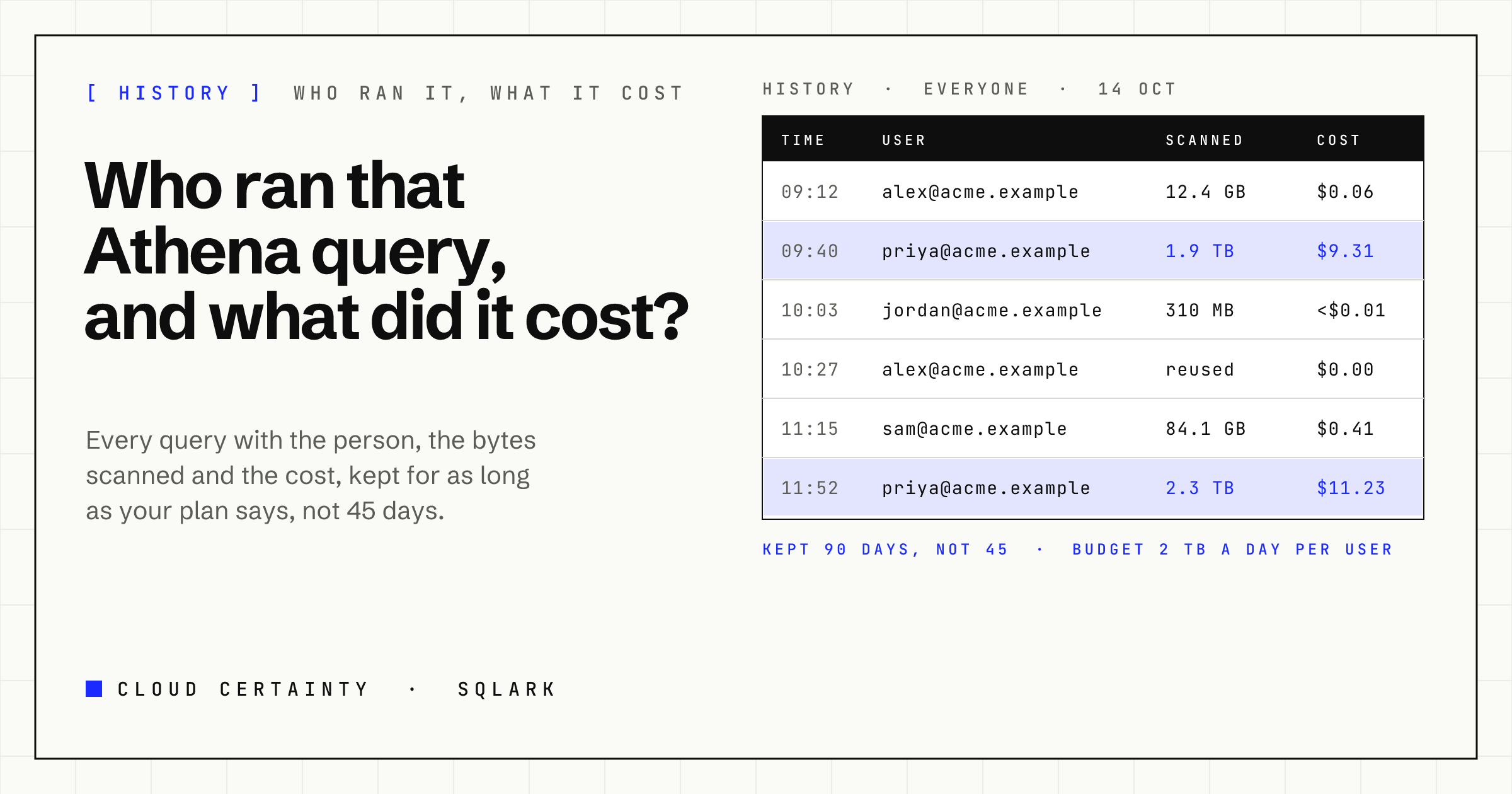
The history page shows your own queries, and administrators can see everyone's by day, with filters for status and source. It is kept for as long as your plan keeps history, from 30 days to two years, instead of 45.
Two kinds of reuse show up as such, so they don't inflate the numbers: Athena's own query result reuse (opens in a new tab), which scans nothing, and SQLark's per-person reuse, which returns your earlier run of the same SQL without starting a new one.
Usage per person and per workgroup
Administrators get a usage page with queries, failures, data scanned and estimated cost per day. On the Business plan it also lists the top users and the top workgroups over the period, which answers the question on the bill directly, without a CloudTrail pipeline.
A budget per person
On the Business plan you can also set a daily scan budget per user, in gigabytes. Once a person's scanned bytes for the day reach it, SQLark refuses new queries for them until the next day, with a message that says why. It complements Athena's per-query limit: the workgroup limit stops a single runaway query, the budget stops a day of them.
The short version
Athena tells you what a query cost. It doesn't tell you who ran it, and it forgets after 45 days. You can rebuild that from CloudTrail, or you can run queries through a console that records it as it happens. SQLark does the second, in your own AWS account. See the SQLark page (opens in a new tab) for the demo and documentation.