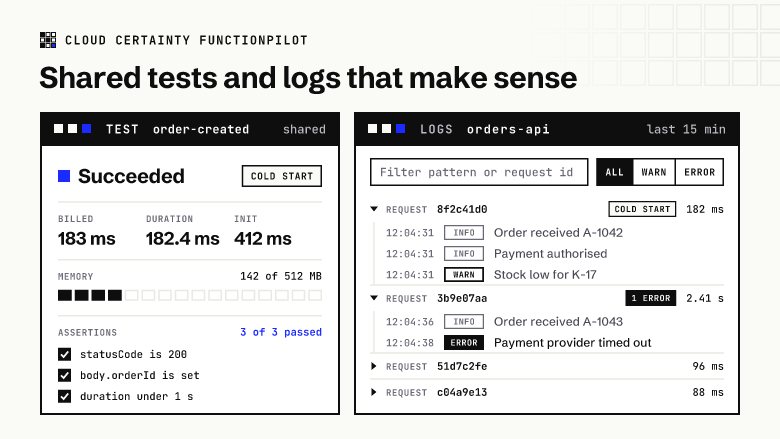
Testing a function in the Lambda console is quick: paste an event, press Test, read the result. The trouble starts when it becomes a habit for a team. Every engineer builds their own events, the good ones live in someone's browser, and when a function misbehaves nobody can say what it returned last week.
What the console gives you
The console's test events come in two kinds:
- Private events: up to ten per function, visible only to the person who saved them.
- Shareable events: stored as schemas in the EventBridge schema registry (
lambda-testevent-schemas), which means everyone who wants to use them needs a handful ofschemas:*permissions. They also stay behind when the function is deleted.
Either way, the result of a run is shown once and then gone. There is no record of what the function returned, how long it took or whether it was a cold start, and nothing checks the response for you: a test "passes" if the function didn't throw, even when it returned a 500 inside an API Gateway response.
Saved tests that belong to the team
FunctionPilot keeps saved tests in its own table in your account, not in the schema registry, and without a ten-event limit (each plan has a generous per-person allowance). A saved test is either:
- Private: only you see it, for experiments and half-finished events.
- Public: shared with everyone who may invoke that function. Only its owner or an admin can change or delete it, and the page warns that its payload and results are visible to the team, so real customer data and secrets stay out of it.
Twelve templates (API Gateway REST and HTTP APIs, ALB, SQS, SNS, S3, EventBridge, DynamoDB and Kinesis streams, schedules, Cognito triggers) give you a correct event shape to start from, and the JSON editor points to the line and column of any mistake.
Every run on record
Each run of a saved test is kept with its payload, response, log tail, billed duration, init duration and memory used, so the history of a test answers questions like "when did this start taking two seconds?" or "what did it return before Friday's deployment?". A run shows a cold start badge when the function had to initialise, and since August 2025 AWS bills that init phase too, so seeing it per run matters for cost as well as latency. From any run, one click opens every log line of that request.
Assertions: tests that actually check something
A saved test can carry up to 20 assertions, checked on every run:
- Status: for API Gateway proxy results, the
statusCodeinside the response, not just whether Lambda returned without an error. - JSONPath: a value in the response, for example
$.body.orderIdexists or$.body.items[0].statusequalsPLACED. When the function returns an API Gateway proxy response, FunctionPilot parses its JSONbodyfor you. - Duration: the run took less than, say, 1,000 ms.
- Function error: the function did, or did not, raise an error. A test like "missing id should fail" passes when the error is there.
The run result lists each assertion with what it found, and a test only shows as passed when every assertion did.
Run all tests
Run all tests runs every saved test of a function you can see, one after another, against $LATEST or a chosen version or alias, and summarises passed, failed and skipped. It is a quick check after a deployment, or before you move an alias, without writing a test harness. Each run is stored and audited like any other.
Who may run what
Running tests needs the invoke permission on the function, which admins grant per user or group by function name pattern. A team can have invoke on its own functions in staging and only view and logs in production, and AWS enforces that through the session policy on every request.
FunctionPilot is in early access. To try it on your own functions, get in touch (opens in a new tab).