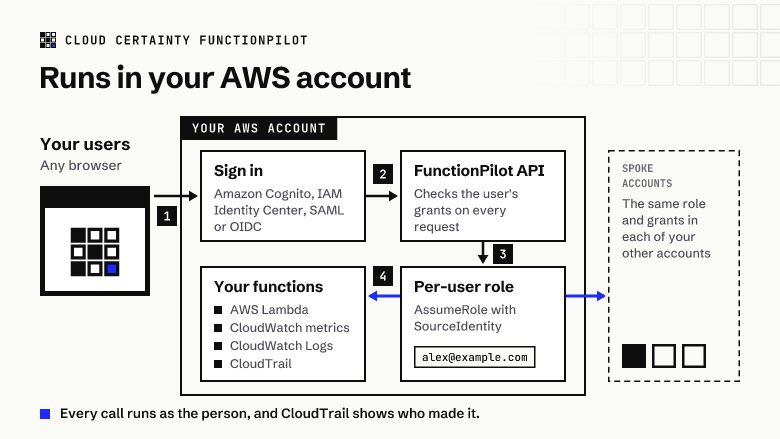
Most teams start with a simple rule for Lambda: if you need to look at a function, you get console access. It works until you notice what that access includes. A support engineer who only needs to read a function's logs can usually also read its environment variables, change its configuration and, depending on the policy, deploy new code. A tester who needs to invoke one function can invoke all of them. And when something changes, CloudTrail shows a role session called something like AWSReservedSSO_Developer_3f2a/alex, if you're lucky, or a shared role name if you're not.
Writing IAM policies that fit each person is possible, but it doesn't scale well. Policies are per role, not per person, function names change, and tag-based conditions don't cover every Lambda action. This post looks at a different shape: decide access per function in one place, and let AWS enforce it on every request.
What people actually need
Who touches a Lambda function, and why, tends to fall into a handful of separate permissions:
| Permission | What it allows | Who usually needs it |
|---|---|---|
| View | The function list, configuration and metrics | Everyone on call |
| Logs | Reading and searching CloudWatch logs, live tail | Support, on call |
| Code | Reading the deployed package | Reviewers, support |
| Invoke | Running tests and saved test events | Testers, developers |
| Edit | Changing configuration, environment and code | A few developers, mostly outside production |
| Manage | Versions, aliases and concurrency | Release owners |
They are separate on purpose. Anyone with any of them can see the function, and Edit includes Code, because you can't sensibly change code you can't read. Beyond that, being allowed to invoke a function says nothing about reading its logs, and reading its logs says nothing about reading its code.
Each permission is given to a person or a group for a set of functions in an account and Region, matched by name patterns such as payments-*. "Logs on every payments-* function in production, invoke in staging" is two lines, not a new IAM role.
Enforcing it twice
A permission check in an application is only as good as the application. If the API has a bug, or someone finds a request shape nobody thought of, the AWS credentials behind it still decide what happens. So access should be enforced twice.
The first check is in the application: a request for a function you have no grant on is refused before any AWS call is made.
The second check is in AWS itself. When a request is allowed, the application assumes a role in the target account with an STS session policy built from that person's grants for that request. A session policy can only narrow what the role allows, never widen it, so the effective permissions are the intersection of the two. If the person may read logs for three functions, the credentials used for that request can read logs for those three functions and nothing else. A bug in the first check meets a refusal from AWS at the second.
Knowing who did what
Shared roles hide people. STS has an answer for this called source identity: when a role is assumed, the caller can set SourceIdentity, and AWS records it on every CloudTrail event made with those credentials. Unlike a session name, it can't be changed later in a chain of role assumptions.
Set it to the person's email address and require it in the role's trust policy, and every change in every account says who made it:
"Condition": {
  "StringLike": { "sts:SourceIdentity": "*@*" }
}
Now a configuration change made through a shared role shows [email protected] in CloudTrail, and a request that doesn't say who it is for can't assume the role at all. Scheduled jobs get an identity of their own in the same shape, so they show up as themselves rather than as a person.
When AWS should decide on its own
Grants suit people who sign in with a username and password, or through your identity provider, and have no AWS access of their own. Many engineers already have AWS access through IAM Identity Center permission sets or access keys, and their access is already decided. Adding a second set of rules on top means two places to keep in step, and they drift.
For those people the better answer is to step aside. They sign in with their own Identity Center account (the device sign-in flow) or their own keys, and every call is made with their credentials. What they can see and do is whatever their permission set or IAM policy allows; the application doesn't add or remove anything. CloudTrail shows them as themselves, because it is them. If their credentials are stored, they should be encrypted with KMS and bound to that person, so one user's key can never decrypt another's.
How FunctionPilot does it
FunctionPilot runs in your own AWS account and uses exactly this model:
- Admins give grants to people or groups by account, Region and function name pattern, with the permissions above. People signing in through Cognito, including SAML and OIDC identity providers, get exactly their grants.
- Every allowed request runs on credentials with a session policy built from the grants, through roles in your accounts that require a source identity. The person's email address appears in CloudTrail for every action, and the deployment timeline on each function reads it back.
- People who use IAM Identity Center or access keys can use their own access instead, and then AWS alone decides. Their keys are stored encrypted with KMS, bound to the user.
- Nothing leaves your account: no telemetry and no calls back to us.
Your team gets the function list, logs, tests and code they need, and nobody gets the whole Lambda console because they needed one log line.
FunctionPilot is in early access. If you'd like to try it in your own account, get in touch (opens in a new tab).