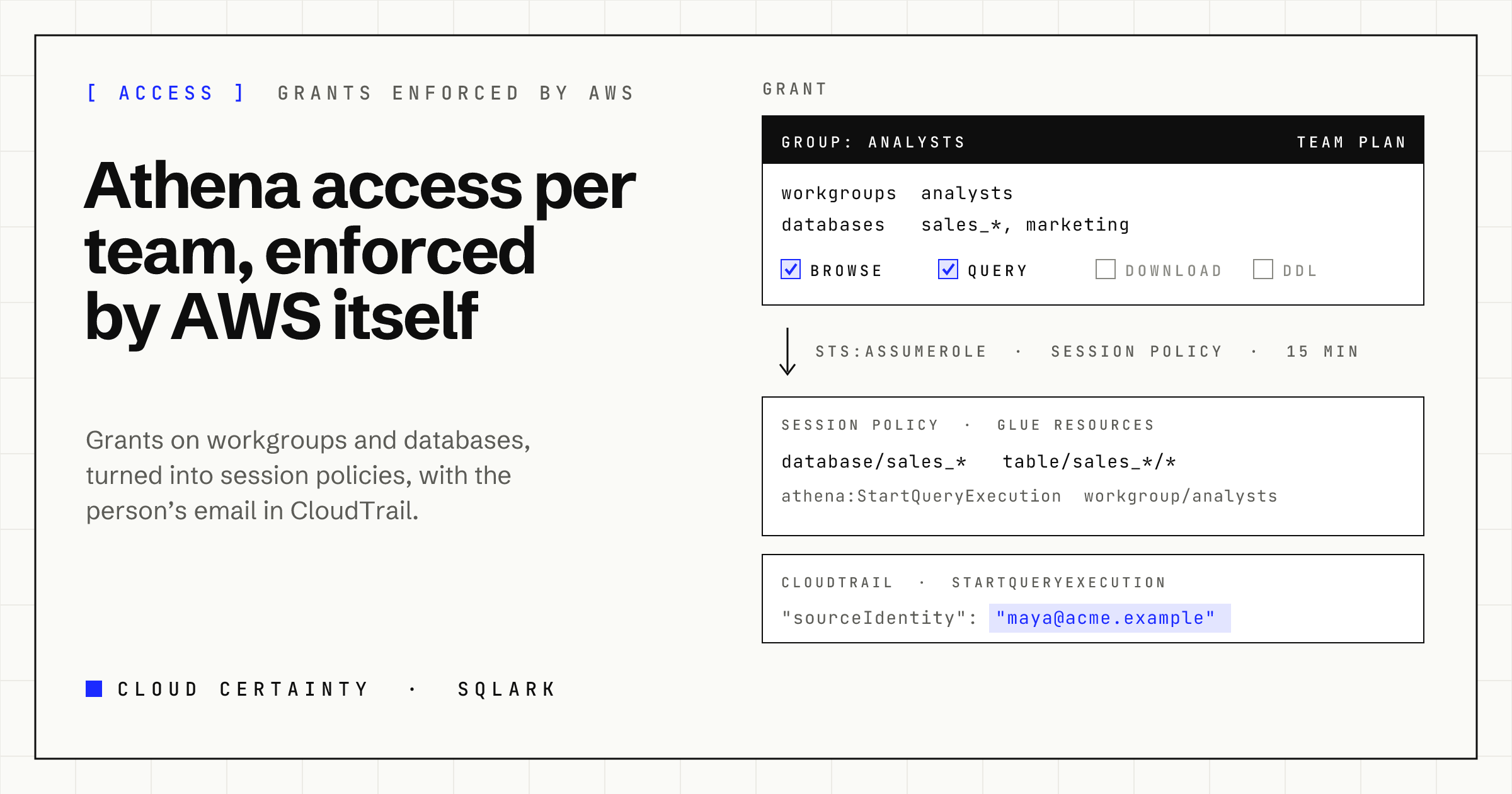
"Analysts can query the sales databases in the analysts workgroup, and nothing else." It is a reasonable request, and in Athena it is surprisingly fiddly to grant, and even harder to keep true once a dashboard tool is involved.
What Athena checks, and with whose credentials
When someone runs a query, Athena checks permissions in several services, with the caller's own credentials (opens in a new tab):
- Athena, on the workgroup:
athena:StartQueryExecution,GetQueryExecution,GetQueryResultsand friends are scoped to workgroup ARNs (opens in a new tab). - AWS Glue, on the catalogue, the database and every table the query touches:
glue:GetDatabase,GetTable,GetPartitionsand so on, scoped to catalogue, database and table ARNs (opens in a new tab). - Amazon S3, to read the table data and to write results to the workgroup's output location.
- AWS KMS, when data or results are encrypted with a customer managed key.
- Lake Formation, when the tables are governed by it.
So "the sales databases in the analysts workgroup" is really an IAM policy that names a workgroup, a set of Glue database and table ARNs, the S3 buckets behind them, and the results location. Then a second one for the marketing team, and a third for the data engineers who also need to create tables.
One detail is worth knowing. The Glue permissions are what actually stop someone querying a table: Athena can't read a table whose definition the caller can't fetch. That makes Glue resource ARNs the natural place to draw the line between teams.
The shared-role problem
Most dashboard and BI tools connect to Athena with one set of credentials. Amazon Managed Grafana's Athena data source (opens in a new tab), for example, queries with the workspace's role. That has two consequences:
- Everyone who can open a dashboard sees what the role can see. Your per-team IAM policies don't apply to people looking at Grafana; the tool's role does.
- CloudTrail names the role, not the person. The question "who ran this" ends at "Grafana did".
You can work around it with a workspace or data source per team, but it multiplies quickly.
How SQLark grants access
In SQLark an administrator writes grants, not IAM policies. A grant says:
- Who: a user (by email) or a group from your identity provider.
- Where: a connection (an AWS account), Regions, workgroup patterns such as
analystsorteam-*, and database patterns such assales_*. - What: one or more of
browse(see databases, tables and columns),query(run read-only statements and see results),download(download and export results) andddl(statements that change data or the catalogue:CREATE,INSERT,DROP,MSCK REPAIRand the rest).
Grants combine per workgroup, never across: a grant on workgroup A for database X and another on workgroup B for database Y never add up to "B with X".
Each connection also has an access level set by the account owner on its role stack: Query or Full. It is the ceiling for everyone, admins included. A production account can be Query, so nobody can drop a table there through SQLark, whatever their grants say.
How AWS enforces it
SQLark checks every request against the grants, but that is the first layer, not the last. For every request by a non-admin, SQLark assumes the connection's role with an STS session policy (opens in a new tab) built from that person's grants for that workgroup:
- Athena actions on that one workgroup's ARN.
- Glue reads only on the granted databases and their tables, and Glue writes only if the statement needs them and the person has
ddl. - S3 writes only to the workgroup's result location, unless the statement is a write and the person has
ddl.
The effective permissions of a session are the intersection of the role and the session policy, so even a bug in SQLark's own checks couldn't reach a database nobody granted. If someone's grants would make a policy larger than the 2,048-character limit, SQLark refuses the request rather than widening it.
Every session carries the person's email as its SourceIdentity (opens in a new tab), so CloudTrail in every connected account names the person on each StartQueryExecution, not a shared role. SQLark's own audit log records grant changes, write statements, downloads and snapshots.
Write statements
SQLark classifies every statement before it runs. SELECT, WITH, SHOW, DESCRIBE and EXPLAIN are reads; everything else, including EXPLAIN ANALYZE of a write, is a write and needs the ddl grant. More than one statement at a time is refused. The classifier is a guard rail with a clear message; the session policy is what makes it stick, because a session without ddl has no Glue write actions at all.
An example
| Group | Workgroups | Databases | Permissions |
|---|---|---|---|
| analysts | analysts | sales_*, marketing | browse, query |
| finance | finance | billing | browse, query, download |
| data-engineering | * | * | browse, query, download, ddl |
Analysts can explore and chart sales and marketing data, but not export it or change a table. Finance can export billing results. Data engineers can do everything, and on a Query connection still can't change anything in that account.
Sharing results deliberately
The one way to show data to someone who has no grant on it is a snapshot: a frozen copy of a result or a dashboard that everyone signed in can open until it expires. It needs download on the data, the dialog says plainly who will be able to read it, and every snapshot is in the audit log. It is sharing by decision, not by accident.
SQLark runs in your own AWS account; see the SQLark page (opens in a new tab) for the security overview and the demo.