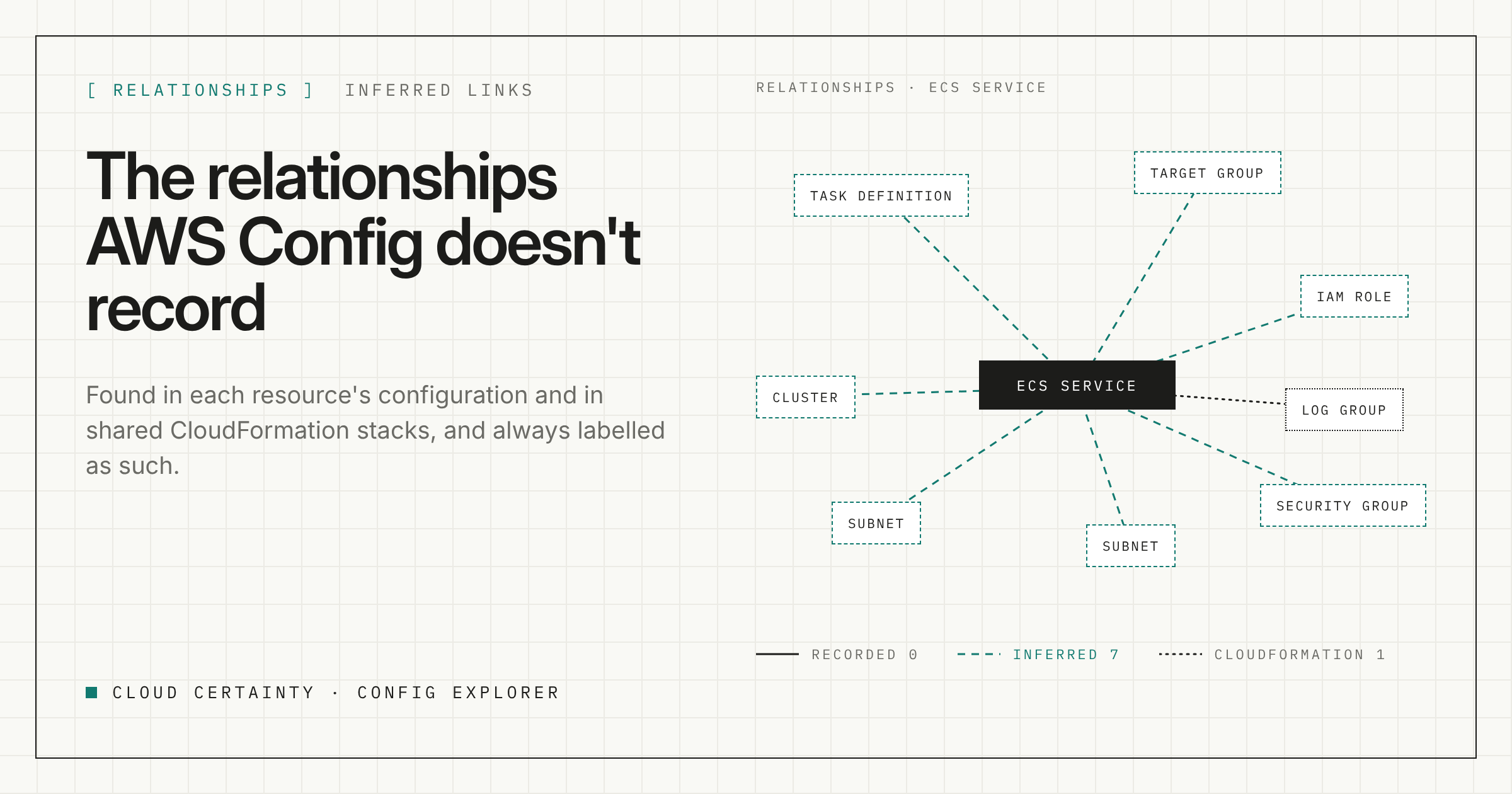
"What does this depend on, and what depends on it?" comes up before every deletion, every migration and every incident review. AWS Config looks like the place to answer it, because every configuration item includes a list of related resources.
For some services that list is thorough. An EC2 instance is related to its subnet, VPC, security groups, network interfaces and volumes. For others it is short or empty.
Where the gaps are
Take an ECS service. It runs a task definition, sits behind a target group, uses subnets and security groups, and its tasks assume IAM roles. In the configuration items we looked at, AWS Config recorded none of those as relationships. Config Explorer shows eight.
The information is not missing. It is in the configuration itself, as ARNs and IDs in fields such as the task definition, the load balancer settings and the network configuration. Config just does not turn those fields into relationships for every service.
The same happens elsewhere: a Lambda function's role and dead-letter queue, an event source pointing at a queue, an alarm on a load balancer. The link is in the configuration, not in the relationships list.
Three sources of relationships
Config Explorer builds its map from three sources and shows where each link came from:
- Recorded by AWS Config. The relationships list in the configuration item, as Config reports it.
- Referenced in the configuration. ARNs and IDs found in a resource's configuration that match another resource in your inventory. These are labelled inferred.
- Same CloudFormation stack. Resources created by the same stack are linked to each other. These are labelled CloudFormation.
Why the labels matter
An inferred link is a strong hint, not a guarantee. A role ARN in a task definition means the tasks use that role. An ID in a field might only be a reference that is no longer in use. Two resources in the same stack were deployed together, but one may not call the other at all.
So Config Explorer never mixes them silently. Recorded links are shown as recorded. Anything worked out from a configuration is marked inferred, and anything from a stack is marked CloudFormation. When you are deciding whether something is safe to delete, you can see exactly how much of the picture comes from Config and how much was worked out.
Exploring the map
Open any resource to see its configuration, its relationships and every recorded version. Or start a graph from it and expand one hop at a time, so you follow only the paths that matter instead of drawing the whole account.
Some resources link to thousands of others. A default security group, a busy subnet or a shared KMS key would turn any graph into a hairball. Config Explorer folds those links so the graph stays readable, and you can still open the folded group when you need it.
In the inventory, related resources work like any other field. Group by related VPC and the inventory becomes a network map. Filter by a related IAM role and you see everything that uses it, across every account in the organisation.
A worked example: can we delete this role?
- Open the IAM role.
- Look at its relationships. Config records few for roles, so most will be inferred: task definitions, Lambda functions and instance profiles that reference its ARN.
- Check the CloudFormation links to see which stack created it, and what else that stack owns.
- Open the history of each resource that uses the role, to see whether it is still in service and when it last changed.
You will not get a guarantee that nothing else uses the role, because Config only knows about recorded resource types and nothing at all about code that assumes the role from outside AWS. But you get a much better starting list than the empty one Config gives you on its own.
Try it
Config Explorer is a read-only Windows app. It reads the Config data you already deliver to S3, runs on your machine and sends nothing to Cloud Certainty. It is in early access: tell us about your setup (opens in a new tab) and we will send you a build.