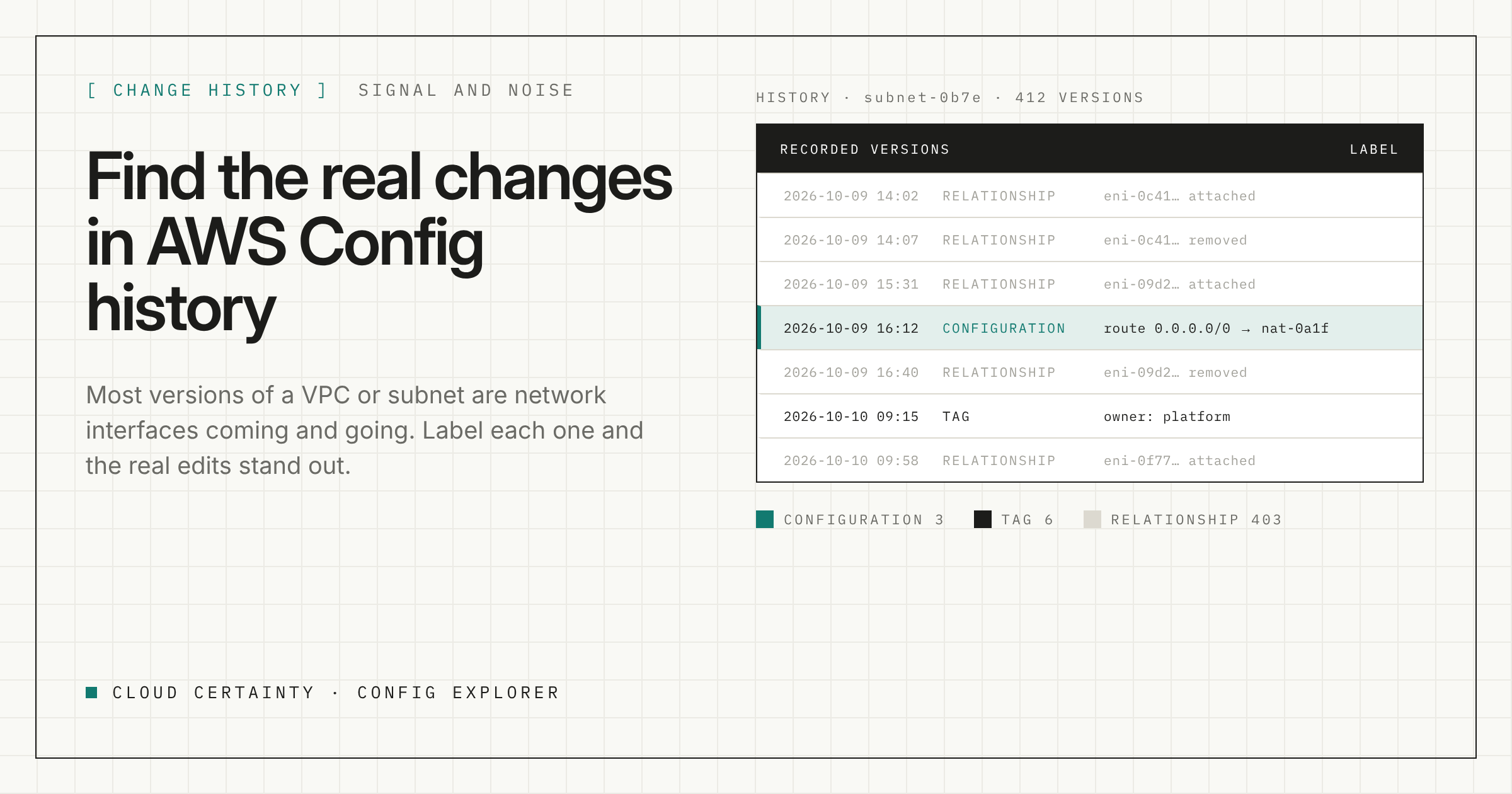
Something changed in a production VPC last week and you want to know what. AWS Config should be the place to look: it records a new version of a resource, called a configuration item, every time the resource changes.
Then you open the timeline and find hundreds of versions. Nobody edited this VPC hundreds of times. So what are they?
Where the noise comes from
AWS Config records a resource's relationships as well as its configuration. A subnet's configuration item lists the network interfaces in it, and a VPC's lists its subnets, security groups and network interfaces.
When a relationship changes, Config records a new version of the resource on each side of it. So every time a network interface appears or disappears, the subnet and VPC it belongs to get a new version too.
And network interfaces come and go all the time:
- Lambda functions attached to a VPC create and remove them;
- ECS tasks using the
awsvpcnetwork mode get one each, so every deployment and every scaling event adds and removes them; - load balancers, VPC endpoints, NAT gateways and many managed services create their own.
In a busy VPC, most of the recorded versions of a VPC or subnet are interfaces being created and removed. The edit you are looking for, a changed route or a new CIDR block, is in there somewhere, between hundreds of versions that differ only in a list of interface IDs.
The same churn can show up on your Config bill, which charges for each configuration item recorded. If it is a large share of your spend, Config's daily recording frequency for selected resource types is worth a look.
Three kinds of change
Every version Config records differs from the one before in one or more of three ways:
- Configuration: a setting on the resource itself changed. A route, a CIDR block, an encryption setting, an instance type.
- Tags: tags were added, removed or changed.
- Relationships: the resource gained or lost a related resource, but its own settings did not change.
Most of the noise is relationship-only changes. Most of the edits you care about are configuration changes. Tags sit in between: often deliberate, rarely the cause of an incident.
Separating them
Config Explorer compares each recorded version with the one before it and labels it as a configuration, tag or relationship change. Open a resource and its history shows the label next to every version, so you can go straight to the configuration changes and skip past the interface churn.
For changes too large for Config to send in a single notification, Config writes an oversized change notification with its own diff. Config Explorer can read those too.
Following a change across resources
Incidents rarely involve one resource. A failing service might come down to a security group rule, a route table and a subnet's network ACL.
Open the resource that misbehaved, expand its relationships one hop at a time, and check the history of each neighbour for configuration changes around the time things went wrong. Because the relationship map includes links Config does not record, inferred from configurations and CloudFormation stacks and labelled as inferred, the neighbour that changed is more likely to be on the map.
Getting the history in
History files are much larger than snapshots. In one eight-account organisation, the latest snapshots came to about 4 MB, and all the history to 3.7 GB. Config Explorer prices every sync before it downloads, re-syncs only fetch new files, and you can keep just the recent history if that is all you need.
Try it
Config Explorer is a read-only Windows app that runs on your machine and sends nothing to Cloud Certainty. It is in early access: tell us about your setup (opens in a new tab) and we will send you a build.